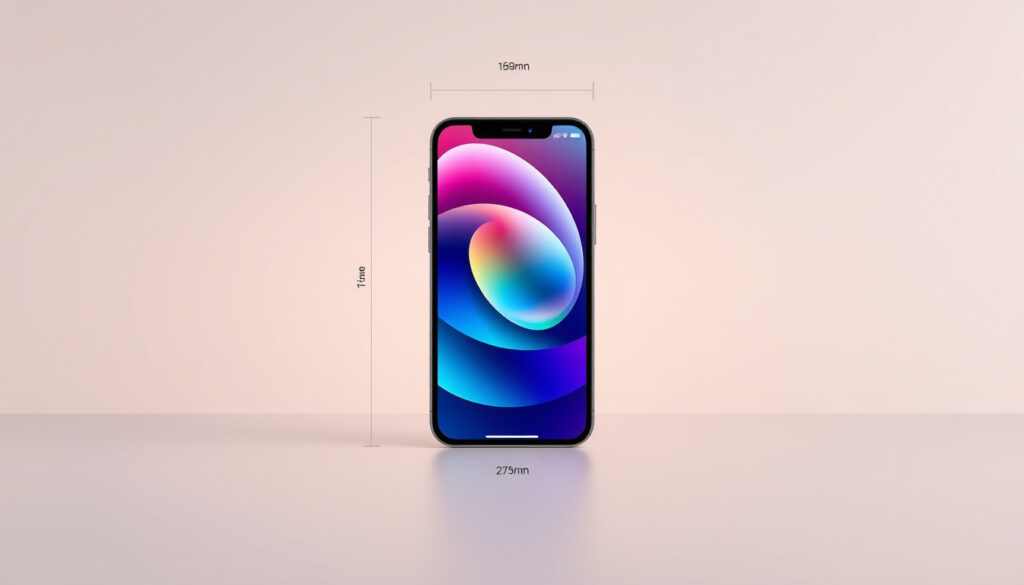
iPhone 16 Pro Max Wallpaper – Size and Free Downloads
The iPhone 16 Pro Max features a stunning 6.9-inch Super Retina XDR display that demands perfectly sized wallpapers to look their best. Getting the right resolution ensures your lock screen and home screen display crisp details, accurate colors, and proper Dynamic Island awareness. This guide covers everything you need to know about finding, downloading, and setting up the ideal wallpapers for your iPhone 16 Pro Max in 2025.
Apple’s latest flagship device brings updated display technology alongside its titanium chassis, making wallpaper selection more important than ever. Whether you prefer official Apple designs, custom photography, or creative artwork, understanding the technical requirements helps you avoid pixelation, misaligned elements, and compatibility issues.
What Is the Ideal iPhone 16 Pro Max Wallpaper Size and Resolution?
- iPhone 16 Pro Max uses ProMotion technology supporting 120Hz refresh rates; wallpapers optimized for smooth motion look best on this display
- Dark mode wallpapers can extend battery life on OLED displays, with approximately 70% of users reportedly preferring darker options
- Apple’s stock wallpapers automatically resize to fit your screen, but custom designs require exact native resolution for optimal sharpness
- Sources providing 4K resolution wallpapers scale perfectly to the Pro Max display without pixelation or quality loss
- Wallpapers should account for the reduced bezels on the iPhone 16 Pro Max compared to earlier models
- The device’s 460 pixels per inch density means higher-resolution sources preserve more detail in small icons and text
| Specification | Details |
|---|---|
| Screen Size | 6.9-inch Super Retina XDR |
| Resolution | 1320 × 2868 pixels (460 ppi) |
| Ideal Wallpaper Resolution | 1320 × 2868 pixels or higher |
| Supported Formats | HEIC, JPG, PNG, Live Photos |
| Dynamic Island | Notch-aware designs recommended |
| Recommended iOS Version | iOS 18 or later for advanced features |
Where to Download the Best Free iPhone 16 Pro Max Wallpapers?
Official Apple Wallpapers
Apple provides official iPhone 16 wallpapers designed specifically for the Pro Max models. These include four titanium-inspired color variants: Desert Titanium, Natural Titanium, White Titanium, and Black Titanium. These designs highlight the sleek titanium finish and frame of the Pro Max devices. You can download them individually or grab complete collections that work across multiple devices including Android phones, Macs, and PCs.
Third-Party Sources
Several third-party creators have produced high-quality wallpaper packs for the iPhone 16 Pro Max. Sources like iClarified offer high-resolution previews with direct download options. Custom wallpaper creators such as Basic Apple Guy have published internal design wallpapers for the iPhone 16 Pro in various color editions. These collections typically come as ZIP files containing multiple resolution variants to ensure compatibility.
Always verify the resolution before downloading. Choose sources that explicitly mention the 1320 × 2868 pixel specification to ensure wallpapers display correctly without cropping or stretching on your Pro Max.
Style Categories Available
Free wallpaper sources typically organize content into several popular categories. Nature-themed options capture solitude and peace through landscapes, forests, and coastal scenes. Abstract designs feature geometric patterns, gradients, and artistic interpretations. Night sky wallpapers make full use of the device’s high resolution to display stars, galaxies, and aurora effects. Minimalist options provide clean backgrounds that work well with app icons and widgets.
What Are the Top iPhone 16 Pro Max Wallpaper Recommendations?
Best Resolution Sources
For the sharpest results on your iPhone 16 Pro Max display, prioritize sources offering exact resolution wallpapers for iPhone 16 Pro Max. These are specifically optimized for the 6.9-inch screen size and accommodate the reduced bezels compared to previous generations. Sources that scale from 4K resolutions generally maintain the best quality when adapted to the Pro Max aspect ratio.
Styles That Work Best
Wallpapers featuring subtle textures and gradients tend to complement the Pro Max’s color accuracy without overwhelming the display. Dark backgrounds pair particularly well with Always-On Display technology, allowing time and notifications to remain visible without distraction. Designs with off-center focal points work better than centered compositions when accounting for the Dynamic Island placement.
Popular Categories in 2025
Current trending styles include minimalist solid colors with subtle gradients, AI-generated abstract art, nature photography with depth effect blur, and retro-inspired designs featuring 80s and 90s aesthetics. Space-themed wallpapers continue gaining popularity as they showcase the display’s contrast ratio and color depth effectively.
The iPhone 16 Pro Max display supports wide color gamut, meaning vibrant wallpapers with rich colors display more accurately than on previous models. Consider this when selecting nature or artistic wallpapers.
How to Set Custom or Dynamic Wallpapers on iPhone 16 Pro Max?
Basic Setup Process
Setting wallpapers on the iPhone 16 Pro Max follows the standard iOS 18 process. Open Settings, tap Wallpaper, then select Add New Wallpaper. Choose from your photo library or the provided options. You can set separate wallpapers for your lock screen and home screen, or use the same image for both. The system allows you to preview how wallpapers appear with your widgets and the Dynamic Island.
Dynamic and Live Photos
The iPhone 16 Pro Max supports Live Photos as wallpapers, creating subtle motion on your lock screen when you press and hold the display. To use a Live Photo, select it during the wallpaper setup process and toggle the Live Photo option. Some third-party apps also offer animated wallpaper options that loop continuously, though these may impact battery life slightly.
Getting Official Apple Options
To access official Apple wallpapers, you can download the official iPhone 16 wallpaper here. After downloading, save the images to your photo library before navigating through the wallpaper settings. Apple periodically releases new wallpapers with software updates, so checking for system updates may reveal additional options.
When using custom wallpapers, enable perspective zoom in the wallpaper settings to add subtle depth. This feature works especially well with landscape and nature photography, creating a sense of dimension on the flat display.
iPhone 16 Pro Max Wallpaper Release Timeline
- : iPhone 16 Pro Max launch; Apple releases stock wallpapers in titanium color variants alongside the device announcement
- : Third-party creators begin publishing 4K wallpaper packs specifically formatted for the new display resolution
- : iOS 18.2 and subsequent updates introduce additional dynamic wallpaper options and enhanced customization features
What We Know for Certain vs What Remains Unclear
| Established Information | Information That Remains Unclear |
|---|---|
| Exact resolution: 1320 × 2868 pixels (confirmed by multiple sources) | Subjective “best” styles depend on individual preference and change with trends |
| PNG format provides best quality without compression loss | Specific iOS 18 dynamic wallpaper feature details beyond standard Live Photos |
| Official Apple wallpapers available in four titanium variants | Future iOS wallpaper features remain unconfirmed pending official announcements |
| Supports HEIC, JPG, PNG, and Live Photo formats | Whether Apple will release additional wallpaper packs in 2025 |
Why Wallpaper Choice Matters for iPhone 16 Pro Max
The iPhone 16 Pro Max represents Apple’s most advanced display technology in a consumer smartphone. The 6.9-inch Super Retina XDR display with its 460 pixels per inch density reveals details that smaller or lower-resolution screens would miss. Wallpapers that don’t account for this resolution appear blurry or stretched, undermining the premium feel of the titanium design.
Beyond aesthetics, wallpaper choices interact with the device’s Always-On Display feature, which keeps certain elements visible while the screen appears off. Darker wallpapers allow this feature to work more naturally, with time, date, and notifications blending into the background rather than standing out harshly. The Dynamic Island also creates a design consideration, as wallpapers with busy patterns around the cutout can create visual distraction.
Sources and References
“Always choose wallpapers at native resolution for sharpness.” — Apple Support documentation
- Apple iPhone 16 Pro Max official specifications page
- iClarified official wallpaper archive for iPhone 16
- iDownloadBlog resolution guide for iPhone 16 Pro Max
- Basic Apple Guy internal design wallpaper collection
Summary: Finding and Setting Up Your iPhone 16 Pro Max Wallpaper
The iPhone 16 Pro Max requires wallpapers at exactly 1320 × 2868 pixels to display properly on its 6.9-inch Super Retina XDR display. Official Apple wallpapers in titanium color variants are available through Apple’s archive, while numerous third-party sources offer free high-resolution options across abstract, nature, and minimalist categories. Setting up wallpapers follows standard iOS 18 procedures, and the device supports both static images and Live Photos. For the best experience, prioritize sources that explicitly provide Pro Max resolution specifications and consider how your wallpaper interacts with Always-On Display and the Dynamic Island.
Frequently Asked Questions
What is the iPhone 16 Pro Max wallpaper size?
The iPhone 16 Pro Max wallpaper size is 1320 × 2868 pixels, optimized for the 6.9-inch Super Retina XDR display with a 19.5:9 aspect ratio.
Does iPhone 16 Pro Max support 4K wallpapers?
Yes, the iPhone 16 Pro Max can use 4K wallpapers. Images at 4K resolution scale perfectly to the native 1320 × 2868 display without pixelation.
Are there official Apple wallpapers for iPhone 16 Pro Max?
Apple provides official wallpapers in four titanium variants: Desert Titanium, Natural Titanium, White Titanium, and Black Titanium. These are available through Apple’s archive.
What formats does iPhone 16 Pro Max support for wallpapers?
The device supports HEIC, JPG, PNG, and Live Photos as wallpaper formats. PNG offers the highest quality without compression loss.
How do I download official iPhone 16 Pro Max wallpapers?
You can download official iPhone 16 wallpapers individually or as ZIP collections from Apple’s archive. Save images to your photo library before setting them as wallpapers.
Does Dynamic Island affect wallpaper selection?
Dynamic Island creates a cutout at the top of the display. Wallpapers with busy patterns around this area may appear distracting. Off-center focal points work better.
Can I use iPhone 16 Pro Max wallpapers on other devices?
Yes, official Apple wallpapers and many third-party options work on Android phones, Macs, and PCs when downloaded at the appropriate resolution for each device.
More related posts
 Charmian Carr: Death, Age, and Life After ‘The Sound of Music’
 Balvinder Sopal: Age, Career, Marriage & Children FAQs
 Can You Reheat Rice? Safe Storage Tips and Reheating Methods
 When Is the Champions League Draw – 2024/25 Dates, Times & Format
 Hope Sandoval biography: what happened to Mazzy Star’s singer
 Elizabeth Olsen: Biography, Age, Height, Net Worth & More
 Bryan Mbeumo Transfer: Man Utd Sign Brentford Star for £71m